[layout] min_column_width puts that floor in your hands — drop it
and more, narrower columns become possible — and the picker now offers shapes with
room to grow into rather than only ones that match the windows open this second. Pinning a
window by hand outranks every rule, so a pin survives changing shape. Right‑click the
rail to trade two tiles or send one to a workspace, one‑handed, no modifier. And the
AI card reads Anthropic’s own limits list — the 5‑hour window, the weekly
one, and the weekly window for whichever model you are on — each with when it resets
and which one is actually binding, switched on from the ⚙ card rather than a config
file.ZIL
The LCARS tiling window manager for macOS
Native Swift
Developer ID · Notarized
SIP stays on
macOS 26
Your windows tile themselves and never overlap — every one gets a slice, and the slices always add up to the whole screen. Two ways to cut it, drag-to-resize bars between every tile, focus-follows-mouse — wrapped in a working LCARS console: the frame around your windows lists them, switches workspaces, and reads out live CPU, memory, Wi-Fi and SSD telemetry. It is chrome that does something.
The surface fills the gaps — windows sit in rounded cut-outs, corners always colour-matched
On the bridge
Zil running a real desk — a 49″ Odyssey G9 at 5120×1440: master-centre layout, the rail listing the crew with the NAV rosette below, stardate · weather · temperature in the bar, sensors live in the frame.
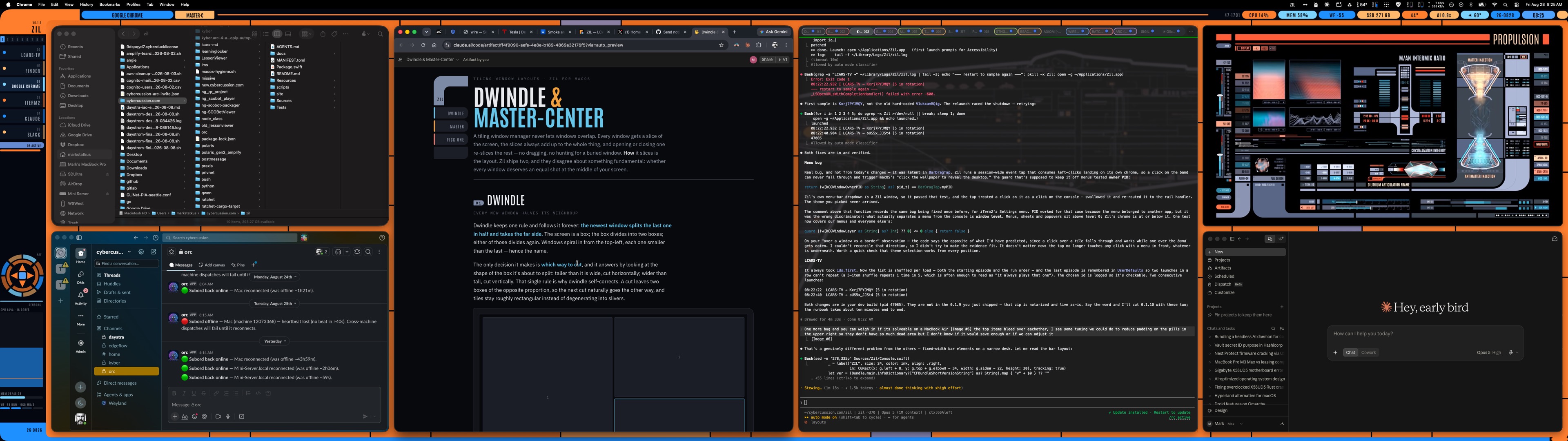
Click for full size (3840×1080)
Download
Zil for macOS
The window manager and the console
# unpack, install, launch
ditto -x -k ~/Downloads/Zil-0.1.29.zip /Applications/
open /Applications/Zil.app
Signed with a Developer ID and notarized by Apple — Gatekeeper opens it without warnings.
Zil needs the Accessibility permission to move and resize other apps' windows; it never asks for anything
else, and granting it on first launch is the whole setup. First run writes
~/.config/zil/zil.toml and takes over from there.
LCARS console for Omarchy
Linux · the console only
# unpack and install — it replaces Omarchy's bar
tar xzf ~/Downloads/lcars-console-0.2.0.tar.gz
cd lcars-console-0.1.0 && ./scripts/install.sh
A quickshell bar plugin, not a window manager and not a port — Hyprland keeps doing the
tiling. Needs Omarchy with quickshell, Hyprland and fontconfig. The seven ship palettes are generated
from Zil's own Swift at build time, so the two consoles cannot drift apart. 0.2.0 brings
ZIL·DOC to Linux: the same document pane, and the same show_document MCP tool
for your agents. What crossed over, and what did not →
Systems
Bento tiling
Two layouts. Dwindle halves a neighbour with each new window, cutting whichever way keeps tiles squarest — no decisions from you. Master-centre holds your real work in the middle of a 32:9 desk with everything else in flanking stacks. Drag the orange bars; neighbours follow. See both layouts run →
Shapes and priorities
Click the layout pill for a card of desk shapes that fit the windows you have open — 2 | 1 1 | 2 is two stacked left, two wide centre columns, two stacked right — and pick one. Focus windows (terminals, editors) take the centre; ambient ones (chat, music, LCARS·TV) take the sides. ⇧‑click two rail rows to trade tiles; ⇧‑click a row then a workspace number to give that app its own workspace.
Nine workspaces
Per display, instant switching — no animation tax. ⌃⌥⌘1–9 to go, ⇧ to move a window, a clickable 1–9 strip on the rail. Layouts persist per workspace.
Tile profiles
Dial in an arrangement, save it under a name, recall it exactly — windows matched by app identity, so profiles survive relaunches and reboots.
Ship themes
Daystrom, Enterprise-D, Enterprise-E, Titan, Voyager — one keystroke rotates the whole console. Red alert mode pulses every surface in phase.
Live sensors
Per-core CPU bars, memory pressure, Wi-Fi signal, SSD free space — in the frame itself. The LCARS is instrumentation, not wallpaper.
Web panels
Chromeless site tiles with persistent logins — Claude, Google Messages — plus LCARS·TV, a YouTube tile with volume and playlist hotkeys, playing fan-made loops streamed from YouTube — swap in your own list any time.
Focus follows mouse
Point at a tile, it's focused. No click, no raise-flicker, and it politely stands down while menus are open or you're dragging.
Self-healing
A hung app never hangs the desk — every app gets its own actor thread. Drifted windows are guided back; stubborn ones get circuit-broken, not fought.
Config as text
One TOML file, hot-reloaded, with per-machine profiles: your 49″ desk and your 13″ Air each get fitting gaps and chrome from the same config.
Enterprise·D Views
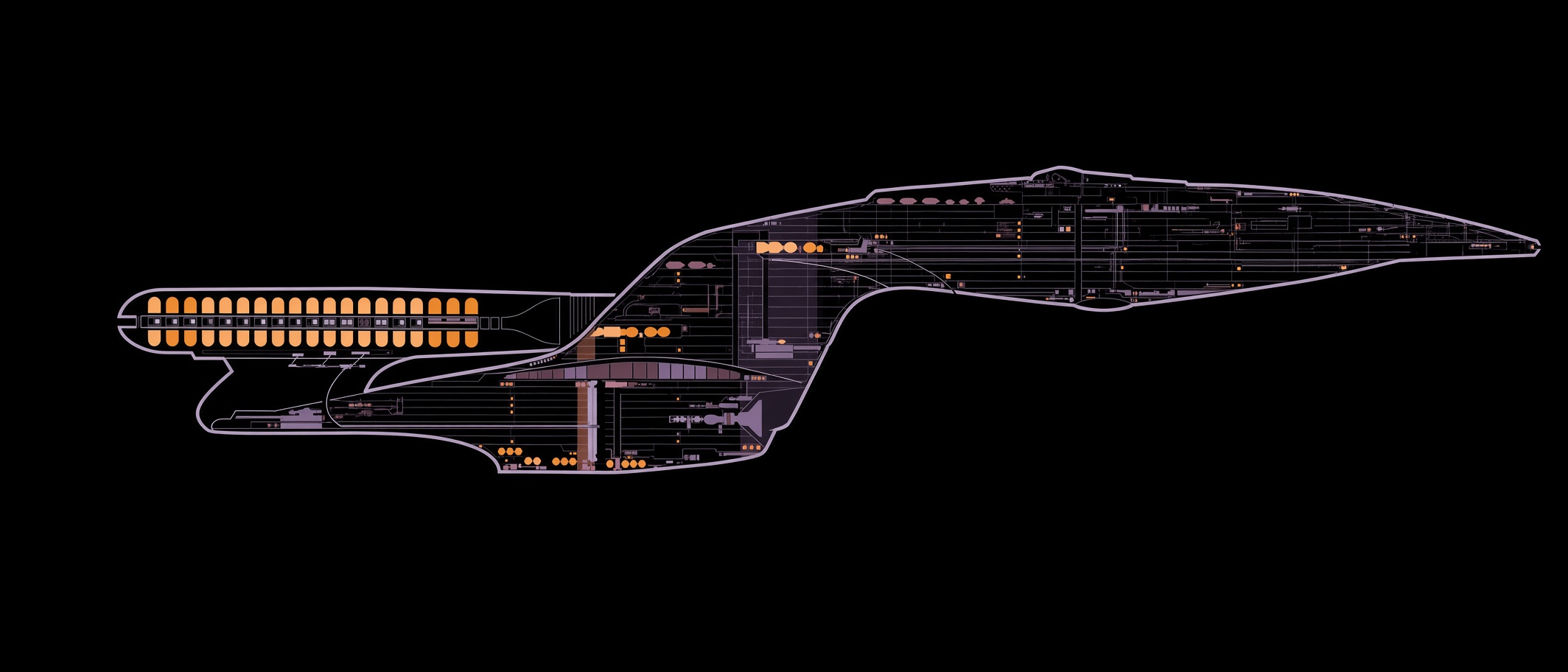
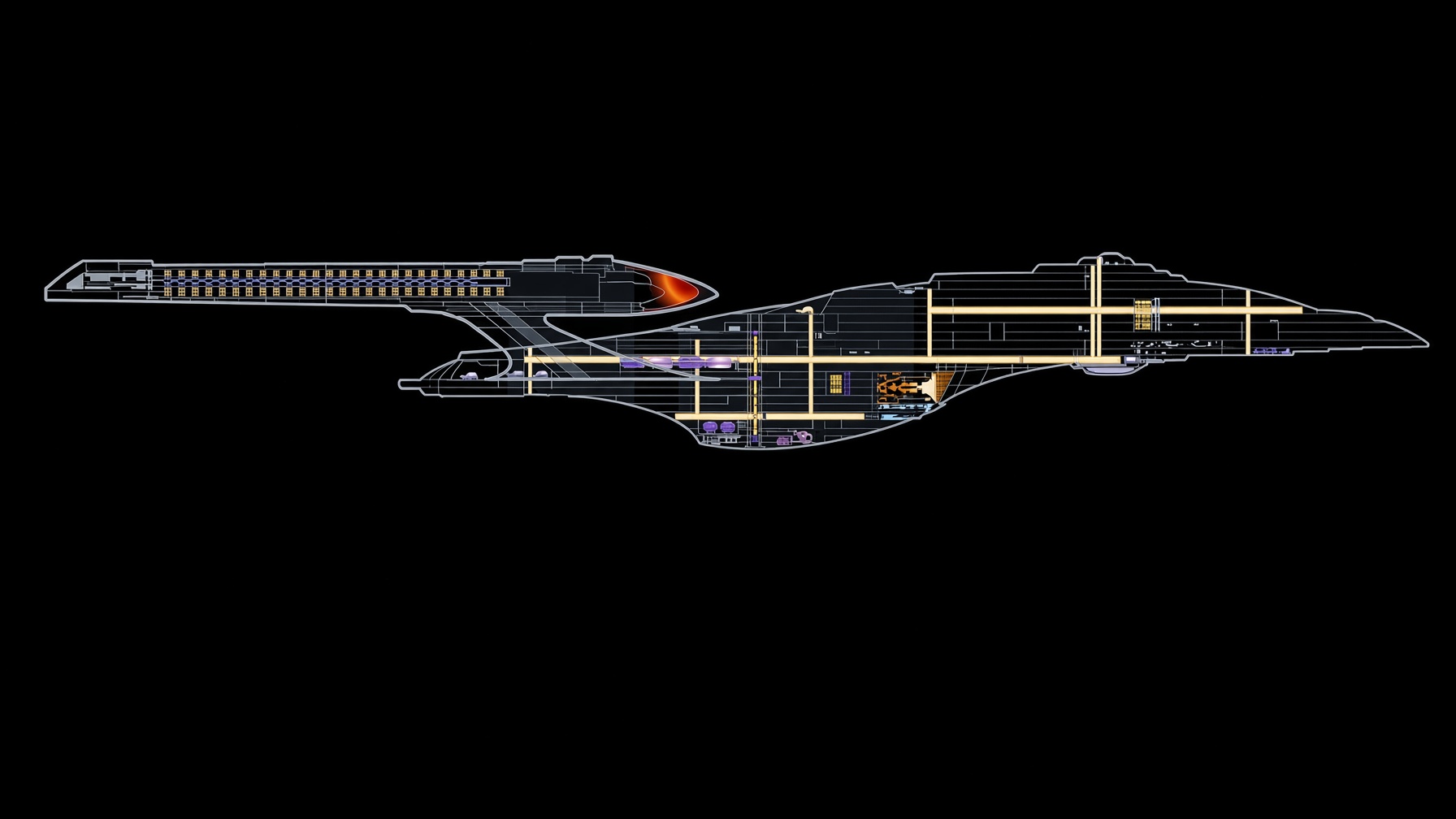
A web panel Zil ships with rather than one you add: a Galaxy-class starship holding station at a starbase, drawn live in the tile. Not a game you play — a ship you keep half an eye on while you work. Open it from PANELS in the menu bar; ⌃⌥⌘W closes it like any other panel.
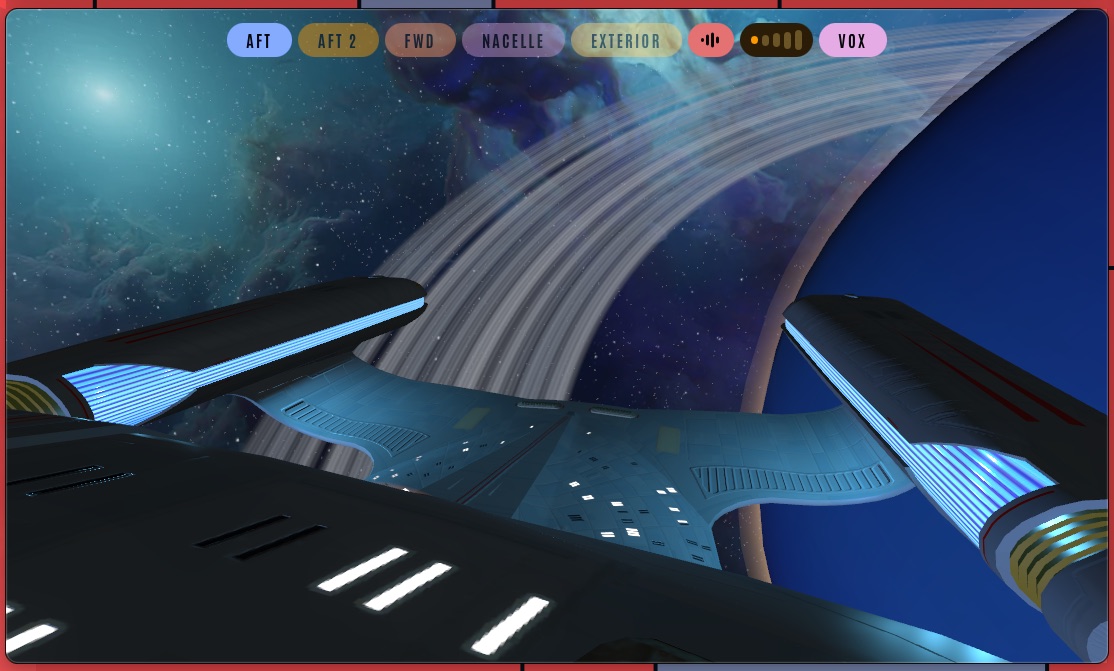
Aft over the saucer, mid red alert — click for full size
The pills along the top move the camera. AFT and AFT 2 look back across the saucer, FWD runs up the bow, NACELLE sits alongside the warp engines, and EXTERIOR pulls out to the whole ship. Beside them: mute, five volume steps, and VOX for the bridge crew. When the ship comes under attack the desk answers with it — the LCARS borders flush red, and stand down again when the shooting stops.
The crew only speak to a signed-in session. Sign in to Google inside the panel and the bridge starts talking; leave it signed out and you still get engines, weapons and music, just no voices. One thing to know going in: a panel is a WebKit view rather than Safari, so passkeys and saved-password autofill cannot reach it — verifying on another device is the way through. The session then lives in that panel's own store, so it is once, not every launch.
Two ways to fill a screen
Both layouts guarantee the same thing — every window gets a slice, and the slices add up to the whole screen. They disagree about whether every window deserves an equal shot at the middle. Open a few and watch.
Dwindle
Each new window halves its neighbour and takes the far side, cutting whichever way keeps tiles squarest. No decisions from you — but the window you care about shrinks every time.
Master-centre
Your real work holds the middle column and keeps it. Everything else alternates into two flanking stacks, and once those fill, new windows join the centre.
Flip the desk to 32:9 and dwindle's rule works against you — the boxes stay wide, so the cuts stay vertical and you get ever-thinner columns. That is why Zil opens any desk wider than 2.2:1 in master-centre, and why ⌃⌥⌘T exists.
LCARS on Omarchy
Zil is macOS only, and on Linux most of it would be dead weight: roughly two fifths of the code exists to fight the Mac — the Accessibility API, the layout tree, code signing — and Hyprland already tiles. So the console crossed over and the window manager did not. This is a quickshell bar plugin for Omarchy (Arch + Hyprland), not a port and not a window manager.
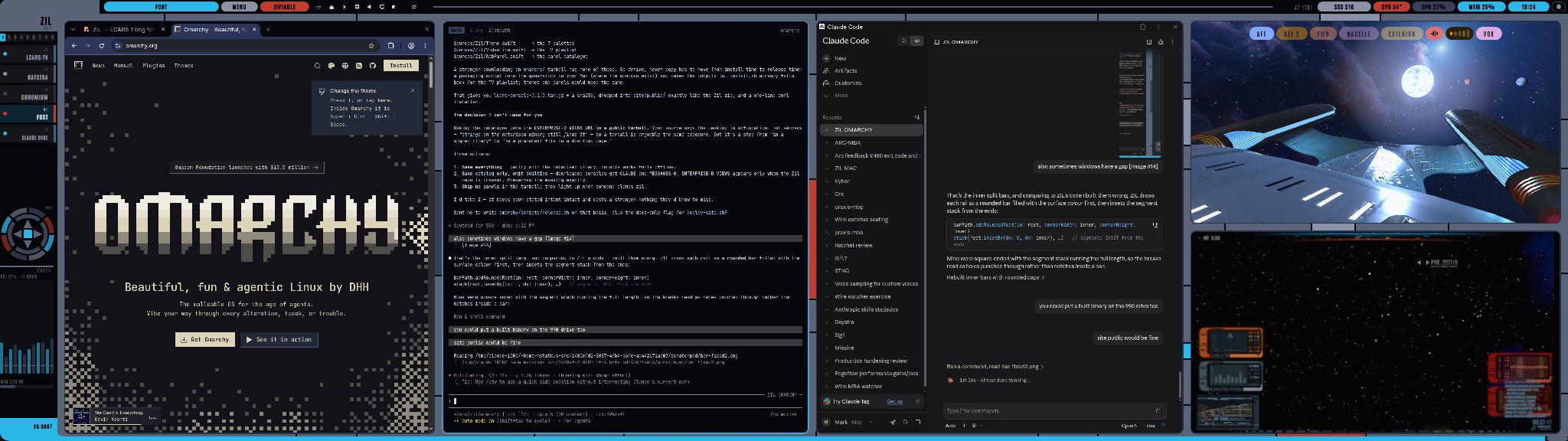
The same console, drawn by quickshell on Hyprland — click for full size
You get the swept elbow, the rail listing the windows on the current workspace with the focused one lit, the 1–9 strip, the NAV rosette, the ambient CPU and memory readout, and the filled band drawn beneath the windows so it shows through the tiling gaps. The seven ship palettes are generated from Zil’s own Swift at build time rather than copied, so the two can never drift apart, and it ships Antonio, the same display face, under the SIL Open Font License. LCARS·TV comes too, reading the same playlist and opening as a browser window Hyprland tiles like any other.
What it does not bring is Zil’s layout engine. Hyprland has dwindle and five master orientations of its own; the console drives those instead of reimplementing them. It changes the bar and the theme, not how your windows are tiled.
Console 0.2.0. The document surface crossed over: ZIL·DOC on Hyprland is the
same lcars-md viewer Zil ships, served from 127.0.0.1 instead of a private
zil:// scheme, with a small bridge standing in for the WebKit message handler. An
MCP server exposes the one tool that matters, show_document, so an agent on Omarchy
puts a plan or a diff beside your terminal exactly as it does on the Mac. Also in this cut: red
alert, the rail carrying both sections, LCARS·TV opening at Zil’s volume rather than
YouTube’s, and the palette ramp no longer sitting one theme behind.
The source lives in the Zil repo under omarchy/, with a README that records
what was kept, what was dropped, and why. Download it up top, beside the Mac build →
A screen your agents can use
An agent that has just written you a plan, a diff, or a table of results has nowhere good to put it. Terminal scrollback is a bad place to read a table and a worse place to read a diff, and opening a browser takes your keyboard away mid-task.
So Zil gives it a pane. show_document renders a file tiled beside the terminal
that asked — LCARS-styled, live-reloading as the file changes, and it never steals
focus. Your agent keeps working; you read at your own pace.
Plans and outcomes
Markdown with real headings, tables and syntax-highlighted code — plus diffs, JSON, CSV, source, images and PDFs. An lcars-chart block turns numbers into a bar, line, gauge or stat readout in the live palette.
Five tools, four read-only
show_document puts a file on screen. desk_status, desk_windows, desk_layout and desk_doctor let an agent see the desk it is drawing on — and none of them can move a window.
Wired up in one command
No config editing. Zil finds the agent clients on your Mac and registers itself with all of them, backing up each file first and refusing any it cannot parse.
zil agents install     # Claude Code · Claude Desktop · Cursor · Windsurf · Gemini CLI
zil show report.md     # or the show_document tool, from any MCP client
The pane is a hardened WebKit view served only from a private zil:// scheme:
no network, no file://, and script inside a document cannot run. An agent can show
you a document; it cannot use one to reach anything else. Every verb also speaks
--json, and the exit codes are API — 0 ok, 2 bad command,
3 not running, 4 refused — so a headless orchestrator can read the
result instead of scraping it.
Hotkeys
- ⌃ Control
- ⌥ Option (Alt)
- ⌘ Command
- ⇧ Shift
Every Zil shortcut starts with all three of the first ones held together — ⌃⌥⌘, one chord your other apps almost never claim. Adding ⇧ gives the same key its second meaning: ⌃⌥⌘J moves your focus to the next tile, ⌃⌥⌘⇧J moves the window there instead. If you would rather hold one key than three, Caps Lock can be remapped to send the whole chord.
| ⌃⌥⌘ T / R / G | toggle layout · retile · toggle gaps |
| ⌃⌥⌘ J / K | focus next / previous — ⇧ swaps instead |
| ⌃⌥⌘ 1–9 | go to workspace — ⇧ moves the window there |
| ⌃⌥⌘ ⇧S / ⇧R | quick-save / recall a tile profile |
| ⇧-click row, row | trade two tiles from the rail |
| ⇧-click row, 1–9 | move the window there and assign its app that workspace |
| click the layout pill | pick a desk shape — 2 | 1 1 | 2, 1 | 4r | 1 … |
| ⌃⌥⌘ ] / A | next ship theme · red alert |
| ⌃⌥⌘ Space | next wallpaper |
| ⌃⌥⌘ X / W | float ⇄ tile this app · close window |
| ⌃⌥⌘ V / P | LCARS·TV · web panels |
Every binding is also in the menu-bar console, grouped LCARS-style. A remappable Hyper key is on the roadmap.
Wallpapers
Five LCARS-era desktops. They live here, not in the app — downloading Zil stays about 3 MB whether you want these or not, and you take only the ones you like.
Zil already cycles a folder of them. Put them where it looks and it will pick them up:
mkdir -p ~/Pictures/Zil && cd ~/Pictures/Zil
curl -fsSLO "https://zil.daystra.com/wallpaper/{enterprise-d,enterprise-e,sensor-1,sensor-2,vortex}.jpg"
Then set the rotation in ~/.config/zil/zil.toml — manual changes only
when you ask (⌃⌥⌘B), or give it a number of seconds to cycle on its own:
[wallpaper]
dir = "~/Pictures/Zil"
cycle = "manual"          # or cycle = "300" for every five minutes
Config
You probably never need this. The ZIL menu handles the day-to-day — theme, gaps, tile profiles, web panels, agent support, LCARS·TV, updates — and writes your choices back to the file itself. The file is here for the things a menu is bad at: per-machine profiles, and rules that pin an app to a workspace or float it on sight.
One file. Saving it reflows your desk in half a second; an invalid file is refused and the last good one stays live. Zil writes its own changes — theme, TV, exemptions — back into it, preserving your comments.
# ~/.config/zil/zil.toml
[theme]
name = "Daystrom"          # Enterprise-D · Enterprise-E · Titan · Voyager

[gaps]
inner = 9
outer = 18

[[rule]]
bundle = "com.apple.iCal"
action = "workspace 3"

[[profile]]                  # the 13-inch laptop gets tighter chrome
match  = { display_count = 1 }
gaps   = { inner = 5, outer = 10 }
chrome = { side_rail_width = 118 }
Ship's log
0.1.29
The desk stops arguing with you. A pop‑over is no longer
mistaken for a window — Chrome’s Gemini panel reports itself exactly like a real
window, so Zil handed it a full row; it now asks whether a thing can be closed, minimised
or zoomed before tiling it. Windows are no longer treated as interchangeable either: the
middle column gives each app the width it has actually been measured to accept, so a
browser that insists on 600 px and a chat window happy at 420 can finally sit side by
side.
0.1.28
Move windows by hand, and say something when they misbehave. Drag a
row in the rail onto another row and the two tiles trade places; drop it on a number in
the 1–9 strip and the window moves to that workspace. The row you are over lights up
and the bar says what the drop will do — and a ✦‑drag does the same now, ringing
the tile it would trade with instead of trading in silence. Every row carries a small
diamond, lit when that window is held in the middle column; click it to pin or release.
New in the ⚙ card and the ZIL menu: Feedback. Pick bug, feature or comment, write a
line, and it files an issue — with the one line of context that travels shown to you
first, and nothing in it that names your machine or you. An agent working with you can
draft one too: by default it does not send, it puts the draft on your screen marked with
the agent’s name and you press SEND. Underneath, a click that fell through the
console onto the wallpaper — which macOS reads as show‑me‑the‑desktop
— is fixed at its cause: a full‑screen window from the Dock was being mistaken
for a menu.
0.1.27
Only a hand moves a window. Two fixes in one lesson. iTerm2 refits
its own frame when a tab opens, and Zil read that as you dragging an edge — a split
bar moved, or two tiles traded places, and the desk reshuffled. A frame change now counts
as a gesture only when the mouse button is down and has travelled; anything else is drift,
and the slot wins. And focus‑follows‑mouse went dead whenever a screen
recorder was open: its helper parks full‑screen windows far above the menu band, and
the focus scan treated them as a surface it must not dismiss. That scan now skips the
capture band exactly as the click path already did. A drag also needs the button actually
down, so a tap that dies mid‑gesture can no longer freeze focus, and
zil doctor reports mouse_focus. And the desk can now be
arranged by intent: desk_arrange takes one plan — which apps go centre,
left, right, float or park — puts the desk back with desk_undo, and
reports every selector it could not match and every window it could not honour as data.
The arrange_for prompt carries the recipe for productivity, a meeting or
focus; the judgement is in the prompt an agent reads, Zil ranks nothing.0.1.26
Shapes you can point at. Click the DWINDLE or MASTER·C pill
and the console offers every desk shape that holds the windows you have open, drawn as
block sketches with the one in force lit —
2 | 1 1 | 2 is two stacked
left, two wide centre columns, two stacked right; 1 | 4r | 1 stacks four
centre rows. Pick one and the desk re‑deals, and the choice lands in
zil.toml. The deal knows what deserves the middle: focus windows —
terminals, editors, anything with a focus rule — fill the centre first;
ambient ones — chat, music, LCARS·TV, or an ambient rule —
fill the sides, and never take a third of the desk on arrival. Two new rail gestures:
⇧‑click one row, then another, and the two tiles trade places completely;
⇧‑click a row, then a number on the 1–9 strip, and the window moves there and
its app is assigned that workspace from now on. zil shape does the picking
from the shell.0.1.25
The click path is asserted, not assumed. After a long sleep a
press on the rail could reach the wallpaper — macOS reads that as
reveal‑the‑desktop and parks every window. The console is click‑through
by design and one event tap is its only click path; a tap whose port dies across a sleep
gets no notice and stays dead. Zil now checks the tap every tick and on wake, re‑arms
or re‑creates it, reports it in
zil doctor, and names the window that
won a press it should have taken. A learned window minimum larger than 60 % of the
desk is refused as a transition rather than a constraint, and poisoned ones are discarded
on load — one had a side column widening to 2105 px every morning. New verbs:
zil centre pins a window into the middle column or releases it, and
zil swap trades two tiles' slots.0.1.24
Fullscreen keeps its seat. Send a tiled window to native
fullscreen and come back, and the desk is exactly as you left it. Zil used to read the
window swelling to the whole display as a hand dragging the column bar, then drop the
window from the layout while it was away and re‑place it by the rules on return
— every neighbour shuffled twice. Now the slot is held: the band closes over it, the
rail marks the row FULLSCREEN, and esc puts the window straight back. The document pane
wears the console bar's own header — cap, joint, name, path, bar, KIND · SIZE
· COPY, end cap — and COPY puts the file's raw text on the pasteboard, for
handing a rendered report to another agent.
0.1.23
The bar's readouts are yours to switch. A gear on the end cap
right of the clock opens a bank of LCARS dip switches, one per readout — CPU, MEM,
WF, SSD, TEMP, AI, WX, DATE, TIME — up for on, and the bar re‑draws as you flip.
The choice lands in
zil.toml as [widgets], which hot‑reloads
the other way too. Underneath, three fixes to how a desk is dealt: a phantom slot that
could claim half the desk after a restart is gone; master‑centre's side columns now
widen to hold a window they used to shove into the centre; and workspace 1 is home —
if it ever stands empty while another workspace holds windows, they come to it. The
document pane keeps its ink readable on every palette: an accent too close to the ground
for text is lifted until it reads.0.1.22
A screen recorder can no longer swallow the console. Recording
software lays an invisible sheet of glass over the whole display, and Zil read that sheet
as a menu — something in front that owns the click. So it stepped back from every
press on the rail, the d‑pad and the pills; the click went straight through the glass,
through the console behind it, and landed on the wallpaper, which macOS reads as
show‑me‑the‑desktop. Clicking a window in the list made every window on
the desk disappear. Zil now tells a menu from a pane of glass by the height it floats at:
real menus and sheets — including its own — still take their own clicks, and
anything drifting above them that nothing can click is stepped over rather than deferred
to. LCARS·TV gains an episode as well: a workbee tour of the Enterprise·D.
0.1.21
Red alert breathes as one surface. 0.1.20 taught the alert to pulse the
LCARS borders and leave the black and the readouts alone — but the lettering cut out of
those borders, the ZIL mark and the codes on the elbows, went on holding steady while the
colour behind them faded, so the type appeared to float free of its own panel. The frame and
everything stamped into it now move together, end caps included.
0.1.20
The starship can sound the alarm. When the Enterprise·D panel
finds itself under attack, the whole desk answers — the LCARS borders flush red and
breathe, exactly as though you had called red alert yourself, and stand down again when the
shooting stops. Only the borders move: the frame's black stays black and the readouts stay
legible, where before an alert dimmed the whole console and let the desktop show through
it. The page asks; Zil decides. That channel is open to the panels Zil ships
and to nothing else, so a site you add yourself can never repaint your desk · and
closing a panel that raised an alert lowers it too, so a page that dies mid‑fight
cannot strand you in red. Audio follows the same rule: a panel Zil ships may start its own
sound, while one you add still waits for a click · and panels are inspectable now,
so Safari's Develop menu attaches to one like any other page — the difference between
reading a site's own console and guessing at it.
0.1.19
A starship, built in. ENTERPRISE·D VIEWS joins the panel
list: a web panel Zil ships with rather than one you add, carrying a Galaxy-class starship
holding station at a starbase — no heads-up display, no controls, a scripted camera
moving between dialled angles you switch from the panel itself: aft, forward, along the
nacelles, or the whole ship from outside. The same idea as LCARS·TV, with a
three-dimensional ship in place of a video, and it stays light enough to leave open
· because it lives in the app instead of your
zil.toml, it is always
there, and the Remove panel menu leaves it alone.0.1.18
Dialogs stop getting buried. A Touch ID prompt, an admin request or
an "Empty Trash?" confirmation could vanish behind a window the moment your mouse wandered:
focus-follows-mouse only stood down while the pointer was over the dialog, so moving
it anywhere else raised something on top of the very thing you were about to answer.
Authentication surfaces now hold focus wherever the pointer is, and app dialogs and sheets are
recognised too — they are ordinary windows as far as the system is concerned, so nothing but
their accessibility role gives them away · the check for "which window is really under the
cursor" no longer ignores Zil's own panels, LCARS·TV and document pane, which meant it could
answer with whatever was sitting underneath one of them.
0.1.17
The console gets out of the way of full-screen apps. Send a window to
full screen and the LCARS frame used to paint straight over it — the overlays are set to join
every Space, and a full-screen Space is one. Zil now notices when the Space on screen belongs
to a full-screen app and stands its chrome down entirely, bringing it back the moment you
return to the desk. Together with 0.1.16, that is both halves: Zil stops managing a
full-screen window's geometry and stops drawing on top of it.
0.1.16
Full-screen apps are left alone. Send a window to native full screen and
macOS gives it its own Space and owns its geometry — so Zil now stands down instead of holding
a slot for it and fighting over a frame it can never reach. Leave full screen and it is picked
up and tiled again on its own. Zil already refused a window that was already full
screen when it first saw it; this applies the same rule to one that goes full screen
afterwards, which is the case you actually hit.
0.1.15
Windows stop fighting over a slot they cannot fit. An app that outgrew
its slot could get stuck in a loop you could watch: Zil places it, the window springs back,
five times, Zil gives up for two minutes — then starts again, forever. Two things caused it.
The give-up now remembers which slot the window lost to, so the fight does not simply
restart on a timer. And the check that floats a window too big for any slot was being
permanently switched off after that window's first measurement — so an app that fitted when
it opened and stopped fitting later, because its stack gained a third window, could never be
floated out no matter how badly it overflowed. It now works for a window's whole life. The
log says the numbers too —
insists on 2600×455, slot is 2600×433 — instead of
just reporting that something drifted.0.1.14
The CPU and MEM readouts open too. CPU gives you a bar per logical
core, filling live and turning amber then red as each one loads, with your machine's own
composition underneath — 12 performance, 4 efficiency, read from the hardware rather than
assumed. MEM shows what is actually eating it: the top consumers by
physical footprint, the same figure Activity Monitor reports, so the two agree
instead of quietly differing by hundreds of megabytes. Processes are named the way you know
them — three Claude Code sessions read as one
claude, not three copies of
2.1.247 — and anything the system will not let Zil inspect is left out rather
than shown as zero · uplink now sits above downlink on the Wi-Fi card, ▲ over ▼ ·
zil doctor reports per-core load and top memory, so an agent can read them
too.0.1.13
Updates install themselves. Check for updates now offers
Install & Relaunch — no download, no quit, no drag. Zil fetches the build, checks its
SHA-256 against the feed, verifies it is signed by this developer and notarized by
Apple, confirms the ticket is stapled so the check holds offline, and only then swaps it in.
A valid signature alone is not enough, so the check pins the certificate to Zil's own team: a
validly-signed impostor is refused rather than installed. The swap moves your old copy aside
instead of deleting it and puts it back if anything goes wrong, so an interrupted update can
never leave you with no app. Your settings and Accessibility grant carry over ·
⌃⌥⌘S now flips the centre column between rows and columns under master-centre, where it
previously did nothing at all — and your choice sticks, instead of being undone by a window
that rounds its width up by a few pixels.
Earlier entries — 11 releases, 0.1.0 to 0.1.12
0.1.12
Permissions actually work. Zil is signed with the hardened runtime but
was never signed with the entitlements the hardened runtime requires — so every request for
your calendar was refused locally, in about 17 ms, before macOS was even consulted: no
prompt, no error, nothing in the log. It looked like the OS refusing to prompt a menu-bar
app. It was a missing flag in our own build script. Calendar events now work · a Wi-Fi
card on the WF pill: signal, noise, SNR — the number that actually predicts
whether a link is good — link rate, channel, band, protocol and security, with
downlink/uplink throughput updating live from the interface's own counters · a
Storage card on the SSD pill listing every mounted volume, boot disk first, with a
fill meter that turns amber past 80% and red past 92%. A volume that genuinely will not
report its free space says so instead of being drawn as full · LCARS·TV now carries ten
episodes and opens on a different one each launch · the document pane wears a proper LCARS
end-cap · and the first-run wallpaper copy was looking for filenames that no longer
existed.
0.1.11
Agent support works from the menu, not just the terminal. Registering
from ZIL › Agent support reported "
claude not on PATH" on Macs where
Claude Code was plainly installed, while the identical command from a terminal succeeded — a
GUI app launched by macOS inherits a minimal PATH, and the lookup trusted it. Zil now finds a
client's binary where it actually lives and, failing that, asks your login shell — the only
thing that really knows. Also: the manual-setup line for Antigravity pointed at a folder
instead of telling you to use its in-app MCP settings.0.1.10
Your agents can use Zil now.
zil agents install finds every
agent client on the Mac — Claude Code, Claude Desktop, Cursor, Windsurf, Gemini CLI — and
registers Zil's MCP server with all of them, so handing you a document is something an agent
can just do. No config editing: writes are backed up, atomic and idempotent, a config that
isn't valid JSON is refused rather than clobbered, and the clients that can't be rewritten
safely (Zed's JSONC settings, Antigravity's in-app config) get the exact snippet instead of a
guess. Also in the ZIL menu, and offered once on first launch · the MCP surface goes from
one tool to five: show_document plus read-only desk_status,
desk_windows, desk_layout, desk_doctor — an agent can
see the desk it's drawing on and cannot move a single window · the ZIL menu works again:
clicks on Zil's own dropdown were being swallowed by the same event tap that stops a click on
the console reaching the wallpaper, so picking a theme did nothing · the bar fits a
laptop — it needed 1884 pt and a 13-inch Air has 1470, so the readouts marched over the
app name; every pill now has a floor, surrenders its slack as the desk narrows, and the least
useful readouts stand down rather than overlap · LCARS·TV opens on a different episode each
time · the document pane wears a proper LCARS end-cap · and the calendar card says what
actually happened when access is refused instead of failing silently.0.1.9
Three faults that only show themselves on a real desk. Waking the Mac no
longer leaves two consoles on screen — a display that comes back under a new identity
during the wake flap is no longer adopted as a second desk, and one that disappears stops
painting instead of lingering · a window still finishing its resize is no longer mistaken
for one that refuses to grow, so flipping layouts quickly stops stranding a terminal
centred in a slot it should fill · and the seam is gone where the elbow meets the
band: a single pixel of ground was landing on the surface, cutting a line across a joint
meant to read as one continuous shape.
0.1.8
An AI pill in the bar. One glance at what your AI tools are burning —
Claude Code, Antigravity and Grok, each detected on its own with nothing to configure.
Every number is read from files those tools already write to your disk: no API calls, no
keys, no credentials. Grok's figures are real dollars, straight from
rift's own records. A provider that isn't installed says so instead of showing
a zero, and Zil refuses to draw a progress bar against a limit nobody published — your
5-hour figure is scaled against your own typical session, and labelled as such.
zil ai returns the same data as JSON for agents.0.1.7
Zil shows you documents.
zil show report.md — or the
show_document MCP tool from any agent — renders a file in a pane tiled beside
the terminal that asked, without ever taking your keyboard. Markdown, diffs, JSON, CSV,
source, images and PDFs, live-reloading as the file changes · LCARS data readouts:
an lcars-chart block in any markdown file draws bar, line, gauge and stat
charts in the live palette · the renderer is
lcars-md, shared across the fleet ·
the pane can reach nothing but the document's own folder — no network, no
file://, and document script cannot run.0.1.6
Floats ride on top — detached windows (About This Mac, exempted apps)
re-raise above the desk on every focus change, and hovering one surfaces it fully · clicks
on the console never reach the wallpaper (no more surprise desktop reveal) · soft hover
glow + press pulse across the rosette, workspaces, rail and pills · web panels persist
across restarts with close handles everywhere (rail badge · menu ·
zil panel).0.1.5
Placement learning is per-axis — a window that refuses a slot's height no
longer teaches a phantom width floor (the Spotify refuse-float loop, diagnosed live
through
zil windows and fixed the same hour).0.1.4
The zil CLI + socket (drive the desk from a terminal or an agent;
zil doctor field report) · NAV rosette moves tiles directionally · stardate,
weather and calendar cards · CPU/SOC/fan thermals · per-window corner radii read from the
WindowServer · placement rules that learn app minimums · desk recovery across sleep, lock
and restarts · Sickbay + Picard themes · single-instance guard.0.1.2
Workspaces ×9 · tile profiles · hot-reload config with per-machine
profiles · rebindable keys + leader + cheat sheet · web panels from the menu · ✦-drag ·
built-in update check · app icon.
0.1.0
First fleet build: the LCARS console, dwindle + master-centre tiling,
live sensors, LCARS·TV.
Straight answers
Does it disable SIP or inject into system processes?
No — that is the point. Zil is an ordinary signed app using the Accessibility API,
like a very fast colleague dragging your windows. Managers that promise per-app transparency or
shadow removal do it by injecting into Dock.app with SIP partially off; Zil refuses that trade. That
is a real cost, not a slogan: the window shadow you see against the LCARS surface could be
removed the injected way, and is not.
What does it need?
macOS 26 on Apple silicon, and one Accessibility grant on first launch — that is
the only permission it cannot work without. Calendar is optional and asked for only if you open
the events card. No kernel extensions, no scripting additions, no helper daemons you didn't
ask for.
Is my window data leaving the machine?
No. Nothing about your windows, apps or layout is ever sent anywhere. Zil does
make a few connections, and they are all listed: it checks
zil.daystra.com for a
newer version (and downloads from there when you ask it to update); if you set a zip code it
asks Open-Meteo for the forecast; and the web panels and LCARS·TV you open are ordinary WebKit
views talking to those sites. One more is off unless you turn it on —
[ai] claude_live makes a single call to Anthropic's usage endpoint reusing the
token Claude Code already stored. Otherwise the AI figures are read from files on your
disk.Early software?
Still young, but no longer new — 0.1.13, and it has been the daily driver on
this fleet's desks since 0.1.0. An automated smoke suite (restore, drag-resize, workspaces,
profiles, hung-app resilience) gates every release, and updates now install themselves after
checking their own checksum, signature and notarization.
A fan project
Zil is an independent, fan-made window manager, built out of affection for the look of the computer interfaces in Star Trek. It is not affiliated with, endorsed by, sponsored by, or approved by Paramount Global, CBS Studios, or any other rights holder.
Star Trek, LCARS, and related names and marks are trademarks of their respective owners, referred to here only to describe the design language this project pays tribute to. No claim of ownership is made over them, and no artwork, audio, or other material from the shows is redistributed with the app.
LCARS·TV plays fan-made ambience and loop videos that live on YouTube, published
there by the people who made them. Zil ships nothing but a list of video IDs and embeds
YouTube's own player — no video is bundled with the app, re-hosted, or downloaded, and playback
happens on YouTube's terms. Those videos belong to their creators, not to this project. Point it
at your own list any time from ~/.config/zil/zil.toml.
Zil is given away free and is not sold. The interface is an original implementation of that visual style, written from scratch.